Finance & Accounting

Inlink Books AI – Professional Accounting Software with AI Assistant

A professional cPanel/hPanel-ready accounting software for SMEs, accountants, business owners, managers, and CFOs. Includes invoices, clients, expenses, transactions, reports, business branding, document settings, and an AI accounting assistant with OpenAI API key integration.

1.0.0 Version
Accounting Software / AI Business Tools / SME Finance Theme Type
Commercial/ Reseller License
Preview Gallery

Theme screenshots

Review the main pages, layout style, and responsive interface before purchase.

Overview

Theme Overview

Inlink Books AI is a professional accounting software template built for small and medium businesses, accountants, consultants, agencies, freelancers, and finance teams.

It is designed for easy deployment on cPanel, hPanel, DirectAdmin, and most PHP hosting panels. The software uses PHP, HTML, CSS, JavaScript, and JSON storage, so the demo version does not require MySQL or complex server configuration.

This version includes a modern IBM-style executive dashboard, professional invoicing tools, client management, expenses, transactions, profit and cash flow reports, company branding, payment settings, bank details, and an AI accounting assistant.

The AI assistant can read accounting data and provide useful business insights such as profit summaries, cash flow analysis, unpaid invoice review, expense explanations, and CFO-style recommendations. Users can add their own OpenAI API key from the settings page.

This template is suitable for selling as a standalone accounting software demo, SaaS MVP, private SME finance system, or white-label business accounting platform.

Core Features

What is included

Professional admin dashboard
IBM-style executive layout
SME finance overview
Revenue summary
Expense summary
Net profit summary
Cash flow summary
Receivables overview
Invoice pipeline
Client management
Invoice management
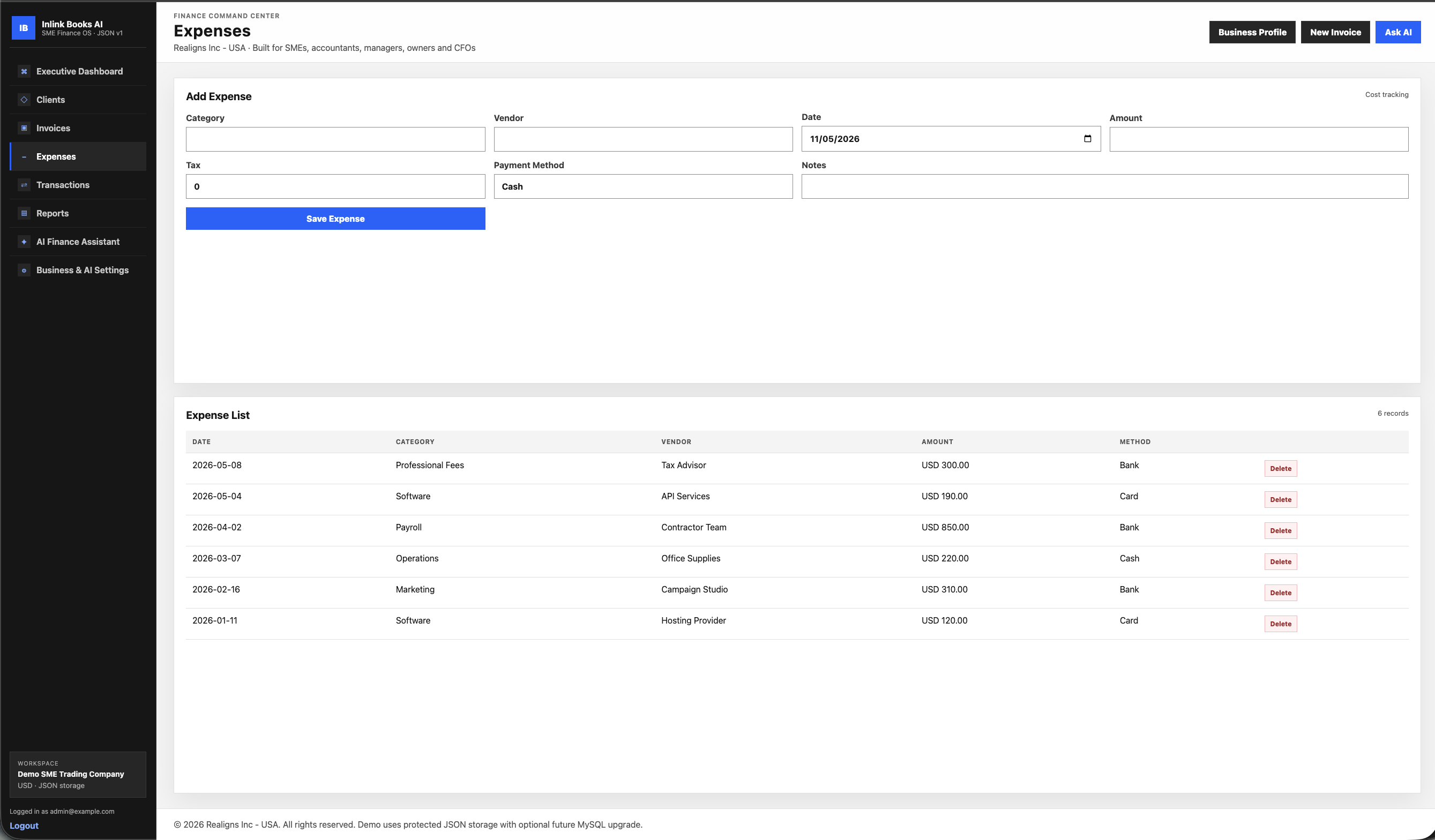
Expense management
Transaction management
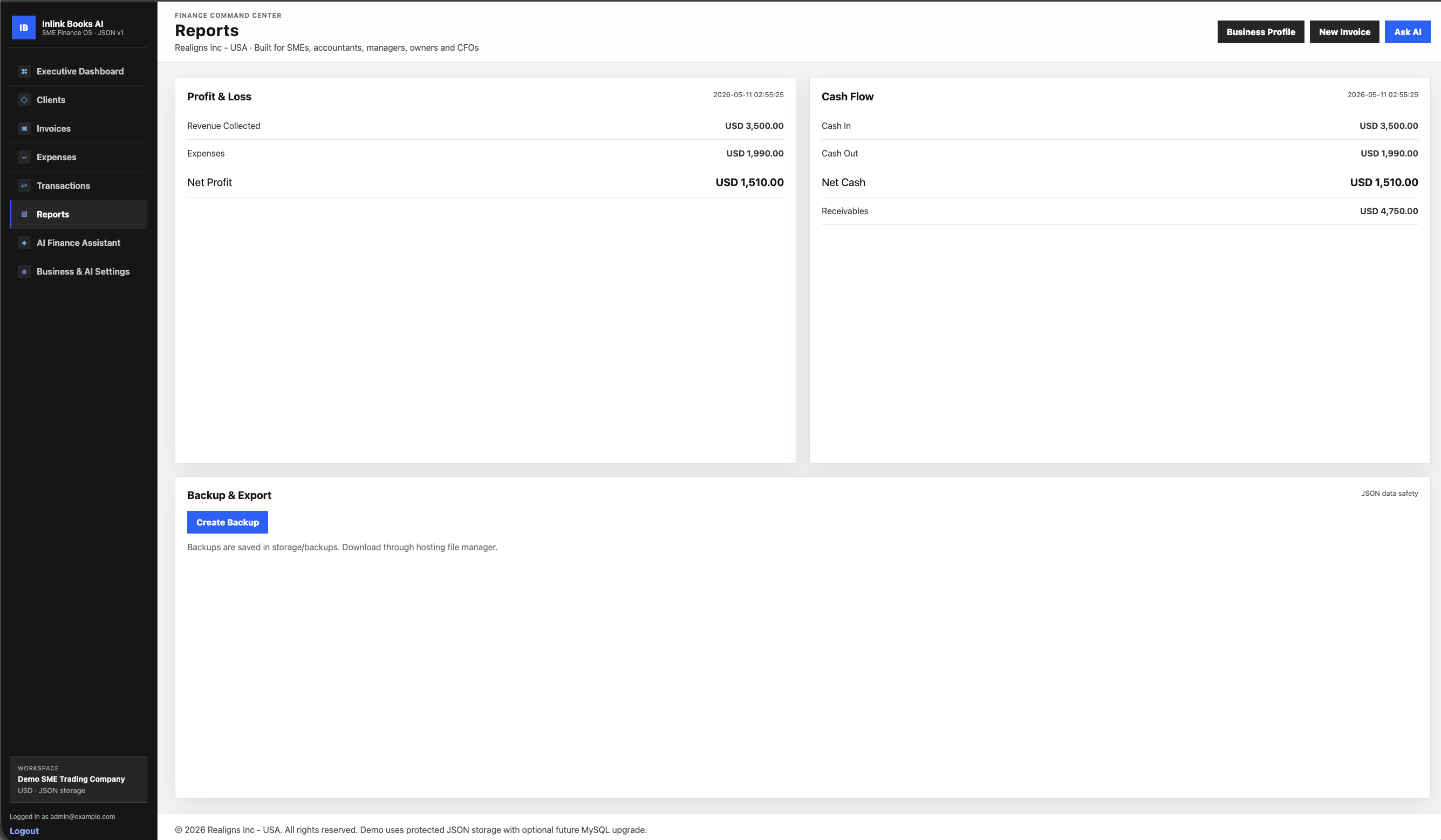
Profit and loss report
Cash flow report
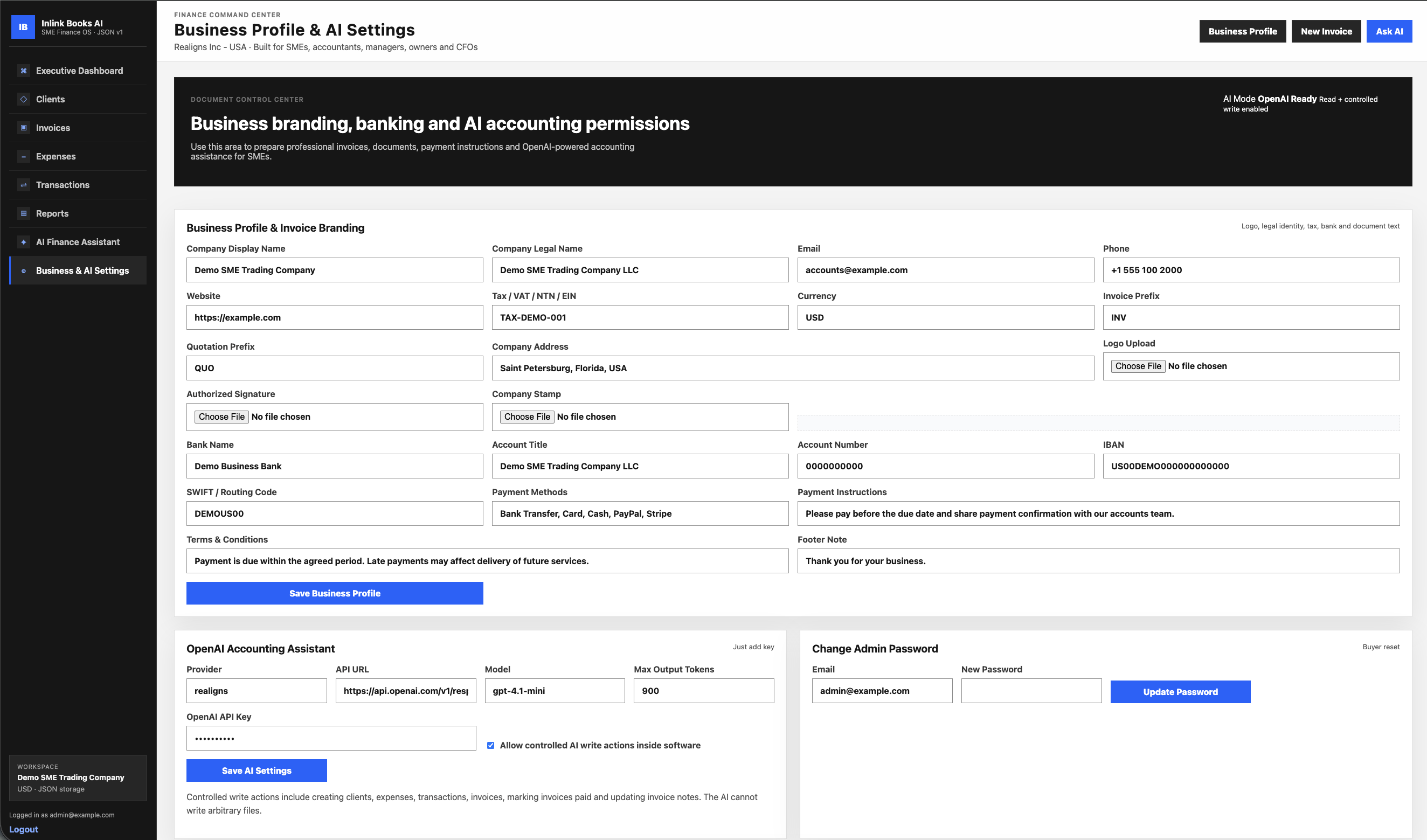
Business profile settings
Company logo upload
Company legal name
Company address
Email / phone / website
Tax number
Bank details
Payment instructions
Terms and conditions
Authorized signature upload
Company stamp upload
Invoice footer note
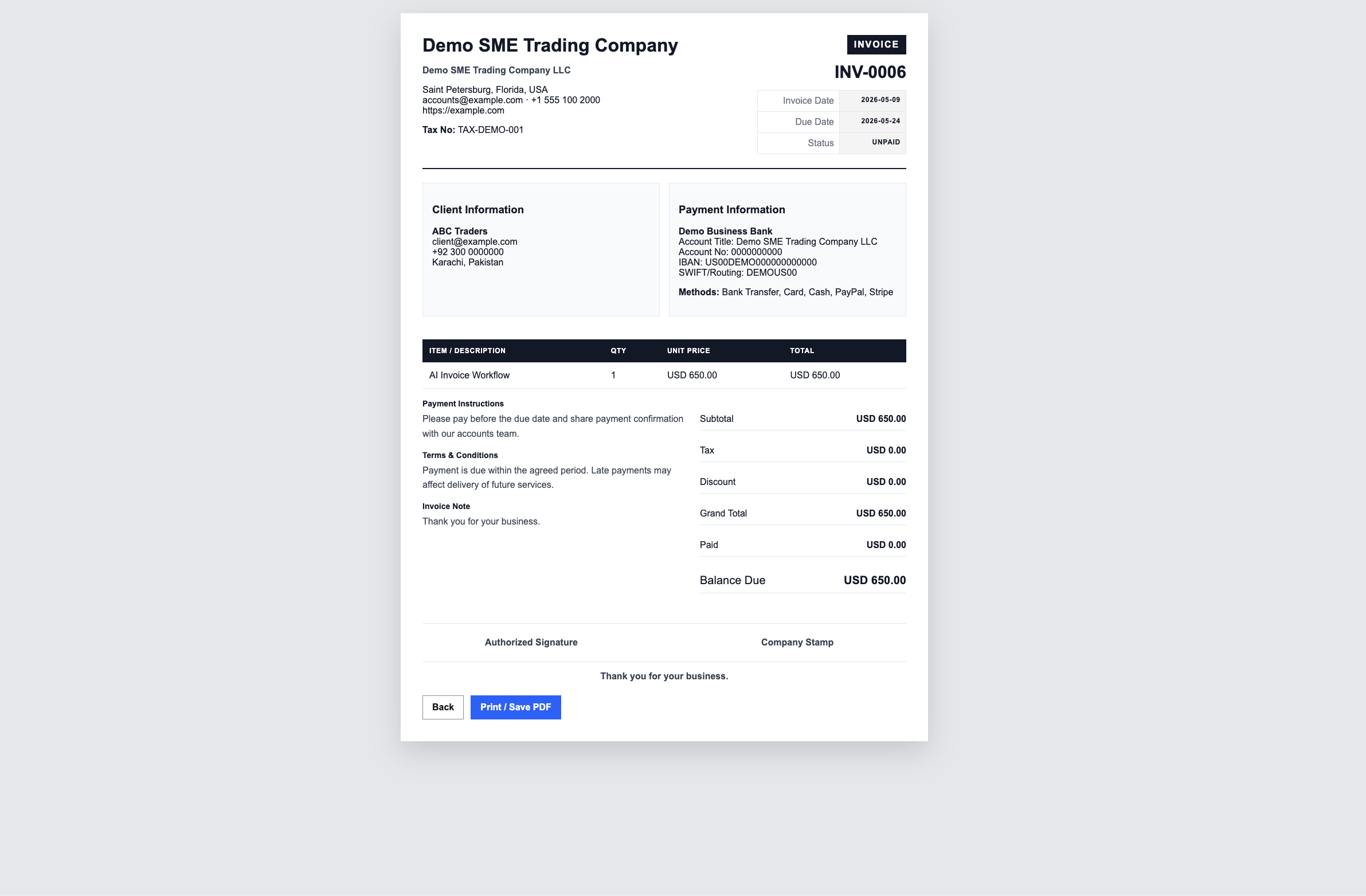
Professional printable invoice
OpenAI API key settings
AI accounting assistant
AI read access to accounting records
Controlled AI write permissions
AI audit trail
JSON data backup
No database setup required
cPanel/hPanel upload-ready
OpenAI API key integration
AI accounting assistant
Profit and cash flow summary
Expense analysis
Invoice review
Receivables explanation
Business health summary
CFO-style recommendations
Create client using AI
Create expense using AI
Create transaction using AI
Create invoice using AI
Mark invoice as paid using AI
Update invoice note using AI
Controlled write permissions
AI activity logs
Company logo
Company legal name
Company address
Email / phone / website
Tax number
Invoice number
Invoice date
Due date
Client information
Items table
Subtotal
Tax
Discount
Grand total
Payment details
Bank details
Payment instructions
Terms and conditions
Authorized signature
Company stamp
Footer note
Printable invoice layout
Save as PDF using browser print
Best For

Ideal use cases

Small businesses SMEs Accountants Freelancers Consultants Agencies Startup founders Business owners CFOs Finance managers Bookkeepers Service companies Digital businesses Local shops Online sellers Web design agencies SaaS founders
Pages Included

Complete page structure

Page No MySQL required for demo
Page Easy upload to cPanel/hPanel
Page Professional accounting dashboard
Page AI-powered business assistant
Page OpenAI API key ready
Page Business branding included
Page Professional invoice documents
Page Good for SMEs and service businesses
Page Can be upgraded into full SaaS
Page White-label friendly
Page Developer-friendly PHP structure
Package Includes

Files and assets included

  • PHP source files
  • HTML page structure
  • CSS styling files
  • JavaScript files
  • Admin dashboard files
  • logo upload folder
  • README installation guide
  • Complete shared-hosting-ready folder structure
  • OpenAI api ready
Installation

How to install

1 1. Download the ZIP file.
2 2. Upload it to your hosting panel.
3 3. Extract it inside public_html or any subfolder.
4 4. Make sure the storage folder has write permission.
5 5. Open the software URL in your browser.
6 6. Login using the default admin credentials.
7 7. Go to Business & AI Settings.
8 8. Add company details, logo, bank details, payment instructions, and OpenAI API key.
9 9. Start creating clients, invoices, expenses, and reports.
10 REQUIREMENTS:
11 PHP 8.0 or higher recommended
12 Apache hosting
13 cPanel/hPanel/DirectAdmin/Plesk or similar
14 File write permission for storage folder
15 OpenAI API key optional for AI assistant
16 MySQL not required for demo version
Commercial Information

License, support and refund policy

License

Regular License:
For personal use, client demos, or one business installation.

Extended License:
For commercial resale customization, white-label deployment, SaaS MVP customization, or multiple client installations.

Support

Support includes basic installation guidance, file structure explanation, and help with default setup issues. Custom design changes, content replacement, new features, payment integrations, and third-party service setup are available as paid customization services.

Refund Policy

Because this is a digital downloadable product, refunds are not available after download unless the product file is corrupted or technically unusable. Support will be provided to resolve installation issues where possible.

Ready to launch?

Buy the theme package and start building your website.

Download access becomes available after payment confirmation and order approval. The ZIP package is designed for shared hosting deployment.